The TinyBit game engine - part 5 - Memory
Computers need memory. Game consoles are, at heart, computers. So it makes sense that the TinyBit virtual game console has limits on how much memory it has.
I come from a background in embedded systems programming, so defining and working within memory constraints is familiar territory. The weird part is that I actually enjoy it. It makes me feel like I'm working at the lowest level the platform has to offer. That feeling is objectively false. Even in real embedded work you're usually dealing with abstractions: an RTOS, a HAL, a heap size someone else picked.
But I digress. The point is that I find working with low-level memory a joy, and I wanted the game developer to have that same experience. So TinyBit exposes a handful of low-level memory functions that let you read and write specific memory locations directly.
This isn't limited to a heap. The same addresses cover the spritesheet, the display buffer, the audio buffer, and even the working Lua stack. That last one is a footgun. If you start poking at the stack while the Lua VM is trying to use it, I would be extremely surprised if your game kept running. There's no protection there. The memory is just memory, and you can do whatever you want with it, including breaking everything.
The API is small on purpose:
peek(addr) -- Return the byte at the specified memory location
poke(dest, value) -- Set a memory location to a specific value
copy(dest, src, size) -- Copy a block of memory from one place to another
Three functions, and with them you can do things like swap sprites at runtime, write directly into the framebuffer for effects the normal drawing API doesn't cover, or stream audio data into the buffer. You can also corrupt your game in interesting ways, which is part of the fun.
I'm hoping that with these tools available users will come up with interesting ways to use them. Fiddling around in the audio buffer to create some cool sound effects, or interesting graphics by copying data to the display buffer. One example that i've played around with is where i modified my spritesheet during runtime by poking the correct address to change a player characters eyes color.
determining the limits
The biggest constraint I had to design around was the total memory budget. Right now it sits around ~422kb. I'm being intentionally vague because this number is the most volatile part of the project and shifts every time I rework a subsystem.
I haven't talked much about microcontroller support in this series, but one of the goals from the start was to run the entire engine on a RP2350. I've always liked embedded programming, and what's better than a virtual console? A real one. More on that in a later post.
The RP2350 has 520kb of SRAM. That's the hard ceiling. Whatever the engine consumes has to fit inside that, minus the buffers needed for the hardware display, the audio output, the SD card driver, and a reasonable amount of stack for the firmware itself. There's no swapping it out for more later. The chip has what it has.
Below is the struct that gets initialized when the engine boots. It accounts for over 99% of the memory footprint of the engine itself. Everything else is rounding error.
// Memory sizes
#define TB_MEM_SPRITESHEET_SIZE     (TB_SCREEN_WIDTH * TB_SCREEN_HEIGHT * 2) // 32Kb
#define TB_MEM_DISPLAY_SIZE         (TB_SCREEN_WIDTH * TB_SCREEN_HEIGHT * 2) // 32Kb
#define TB_MEM_SCRIPT_SIZE          (32 * 1024) // 32Kb
#define TB_MEM_LUA_STATE_SIZE       (256 * 1024) // 256Kb
#define TB_MEM_AUDIO_DATA_SIZE      (12 * 1024) // 12Kb
#define TB_MEM_PNGLE_SIZE           (48 * 1024) // 48Kb
#define TB_MEM_AUDIO_BUFFER_SIZE    (TB_AUDIO_FRAME_SAMPLES * 2) // 734 bytes (367 16-bit samples)
#define TB_MEM_BUTTON_INPUT_SIZE    8 // 8 bytes (button inputs)
#define TB_MEM_USER_SIZE            (10 * 1024) // 10Kb

struct TinyBitMemory {
    uint16_t spritesheet[TB_SCREEN_WIDTH * TB_SCREEN_HEIGHT];
    uint16_t display[TB_SCREEN_WIDTH * TB_SCREEN_HEIGHT];
    uint8_t script[TB_MEM_SCRIPT_SIZE];
    uint8_t lua_state[TB_MEM_LUA_STATE_SIZE];
    uint8_t audio_data[TB_MEM_AUDIO_DATA_SIZE];
    uint8_t pngle_data[TB_MEM_PNGLE_SIZE];
    int16_t audio_buffer[TB_AUDIO_FRAME_SAMPLES];
    uint8_t button_input[TB_MEM_BUTTON_INPUT_SIZE];
    uint8_t user[TB_MEM_USER_SIZE];
};
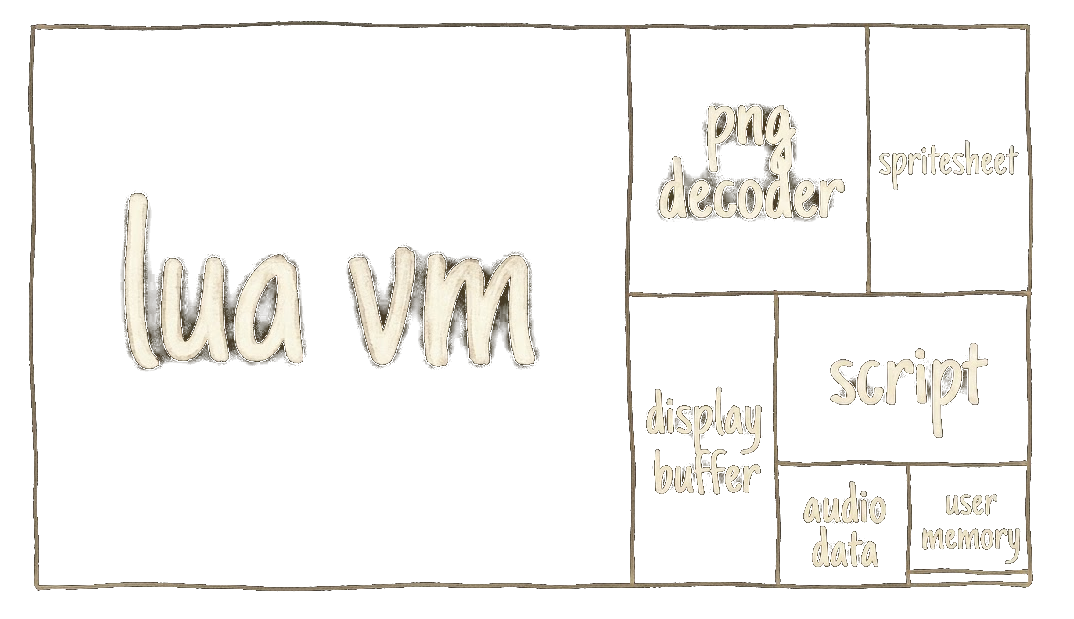
The Lua VM eats most of the budget. I landed on 256kb after implementing Qix, which can chew through memory if you write it the obvious way. Sizing your engine around a single game is a questionable methodology, but the ceiling is set by the chip, not by me, so there isn't much room to negotiate.
comparison to existing systems
Modern software treats memory like it's free. It isn't, but the abstractions have gotten so thick that most developers never have to think about it. A chat app idles at 400MB. A text editor ships a browser engine to render a textarea. A "simple" mobile app pulls in a hundred megabytes of dependencies before it does anything. The default assumption seems to be that memory is infinite and someone else's problem.
Working on a project like TinyBit forces the opposite mindset. Every kilobyte is a decision. You can't paper over a bad data structure with more RAM, because there isn't more RAM. It's a useful exercise, and I think more developers would benefit from spending time in an environment where the budget is small enough to actually feel.
For context, here's roughly how much other pieces of software have used
- The Apollo Guidance Computer (1966) - flew humans to the moon with 4kb of RAM and 72kb of ROM. Our engine has roughly 100x more memory than the thing that landed on the moon.
- The original DOOM (1993) - required 4MB of RAM to run, but the actual engine and active level data at any moment fit comfortably in a few hundred kilobytes.
- The "Hello World" of a modern React Native app (>2015) - a blank screen with no logic typically uses 50-150MB of RAM on launch. That's roughly 100 to 300 TinyBit engines worth of memory to display nothing.
The gap between what's possible and what's normal is enormous. A full game console with sprites, audio, scripting, and a Lua VM fits in less memory than a modern app uses to display a loading spinner. None of this is meant as a serious technical critique since modern software does more, runs on more platforms, and is built by larger teams under different constraints. But it's worth occasionally remembering that the hardware is wildly capable, and most of the bloat is a choice.