the TinyBit game engine - part 6 - audio
Audio has been the most interesting and the most painful part of building TinyBit. A game engine without sound isn't really a game engine, it's a slideshow. So at some point I had to stop avoiding the problem and figure out how to make my little device beep.
Normally when I get stuck on a design decision in TinyBit I look at what PICO-8 does and shamelessly borrow the idea. That wasn't an option here. PICO-8 ships with its own tracker built into the development environment, which is great for them but completely outside the scope of what I want TinyBit to be. I want people to use whatever tools they already like for scripts, spritesheets and audio. Building my own tracker would mean maintaining a tracker, and I'd rather not.
So how does TinyBit do it? Before I get to the answer, I want to walk through the failed prototypes. The dead ends are more interesting than the thing I eventually shipped.
basic principles
I have a background in traditional music. Reading sheet music, playing instruments, the whole thing. So a few principles were non-negotiable for the audio engine.
First: every tone has to be represented by its 12-tone equal temperament name. A, B, C and so on, with sharps and flats as # and b. This makes it much easier to take existing sheet music and drop it into your game without doing maths in your head.

Second: timing should be musical, not arbitrary. When you're defining music you want to think in beats and tempo, not raw milliseconds. Milliseconds are fine for sound effects (a laser doesn't care about the downbeat) but background music needs to feel like music.
Third: timbre is defined by the waveform. By limiting myself to basic waveforms, similar to the original Game Boy, anything you compose will sound retro by default. That nicely matches the system graphics, and it also means I don't have to implement sample playback, which is convenient. I went with SINE, SQUARE, SAW and NOISE. The noise channel doesn't really have a tone, it's just random noise. Each waveform has a personality: sine is round and serene, square is harsh and works as a lead voice, saw sits somewhere in the middle, and noise pretends to be a drum kit. It sounds weird written down but that's exactly how the Game Boy did it, so I'm in good company.
first implementation
Before doing anything clever I wanted to confirm that I could get any sound at all out of the device. So I implemented these functions:
bpm(bpm) -- set the global beats per minute
tone(tone, octave, duration, waveform) -- duration in eights
noise(duration) -- duration in eights
You'd sprinkle these calls throughout your game logic to add sound effects. In the background a waveform was generated and pushed onto the SDL2 audio queue. This was before the project started targeting microcontrollers, so life was easy and memory was infinite.
The only problem was that I couldn't play two sounds at once. If two tones were generated back to back, the second one would patiently wait in line until the first one was done. Not exactly a symphony. But the waveform generator worked, which was the point.
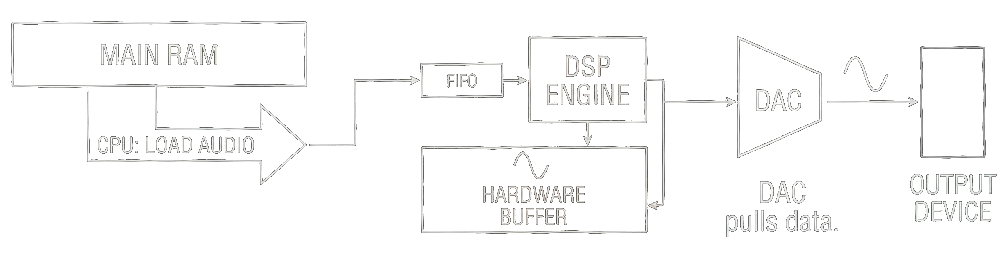
Before this exercise I don't think I had ever seriously thought about how sound is generated and processed on a computer. I didn't know how audio kept playing while the CPU was busy doing other things, especially on single core systems. It's obvious in hindsight: you need dedicated hardware that can push preprocessed audio data to the speaker independently of the CPU. In the early days that hardware was the sound card. Fancy ones synthesized audio from large sample libraries, cheap ones just generated waveforms like my code does. That's why the same MIDI file could sound completely different on different machines.
second try
A waveform generator is nice, but you can't compose a soundtrack by sprinkling tone() calls through your game loop. You need a way to define a music track and loop it. My first idea was a tracker-style format, but in plain text so it could live in code. The first working version looked like this:
CH1 SINE 1/8 E5 V3
CH1 SINE 1/8 E5 V3
CH1 REST 1/8
CH1 SINE 1/8 E5 V3
CH1 REST 1/8
CH1 SINE 1/8 C5 V3
CH1 SINE 1/8 E5 V3
CH1 REST 1/8
CH1 SINE 1/8 G5 V3
CH1 REST 3/8
Each line is channel waveform duration tone volume. You could write multiple channels and, with SDL2_Mixer, actually hear them play together. Bonus points to anyone who recognises the tune.
Technically this worked. I composed a few short pieces and they played in the background of test games. But writing music this way felt like filling out a tax form. I was never happy with it, and it never made it into the main branch. It sat on a side branch for months, quietly judging me.
ABC notation
A few months later the project had moved on. I'd split it into a separate library so I could port it to an ESP32 microcontroller (more on that in a later post). Once everything was running on the microcontroller I was ready to face the audio problem again.
I'd been reading up on textual audio formats that other people had invented, hoping to steal a good idea. Nothing clicked. Then I stumbled onto ABC notation, a textual score format derived directly from sheet music. I can read sheet music and I've arranged a few songs in the past using notation apps like Musescore, so this felt instantly familiar.
While we're here, check out Tentacruel's video series about notation apps on YouTube. It's fantastic and has nothing to do with TinyBit.
ABC notation is already used by games like Lord of the Rings Online and Starbound, which means there's a large existing library of songs in the format. On top of that, you can convert sheet music to MusicXML and then transpile that to ABC. The pipeline opens up a lot: in theory any song that has been written down can end up in a TinyBit game.
Here's what it looks like:
X:1
T:Quite Prodigious
M:C|
L:1/8
K:F
f|fccB AFFc|(d/e/f) (g/a/b) a2 ge|(c/d/f) cA (c/d/f) cA|d/e/f cA G3:|
|:g|g/f/e/f/ gG c2 dG|c2 dG e/d/c/d/ ef|g/f/e/f/ gB Abag|a/g/f/g/ ce f2:|]
I won't explain the syntax, because the whole point is that you don't write this by hand. You export it from a notation app or download it from one of the many ABC archives that exist.
parsing ABC notation
There was one small problem with ABC notation: as far as I could find, no C parser existed. So I did what a programmer in the age of AI does and vibecoded a parser.
I pride myself on having written +90% of TinyBit by hand, mostly because AI tools weren't very good when I started. Letting an LLM write the parser feels like cheating, but I've made peace with it by treating the parser as a separate library that just happens to live next door. This is, of course, a coping mechanism.
The parser is built for embedded systems, which in practice means it works anywhere. You allocate memory and initialise it with the maximum number of notes, voices and chord notes you want to support. Then you feed it a string of ABC and a set of linked lists comes out the other end.
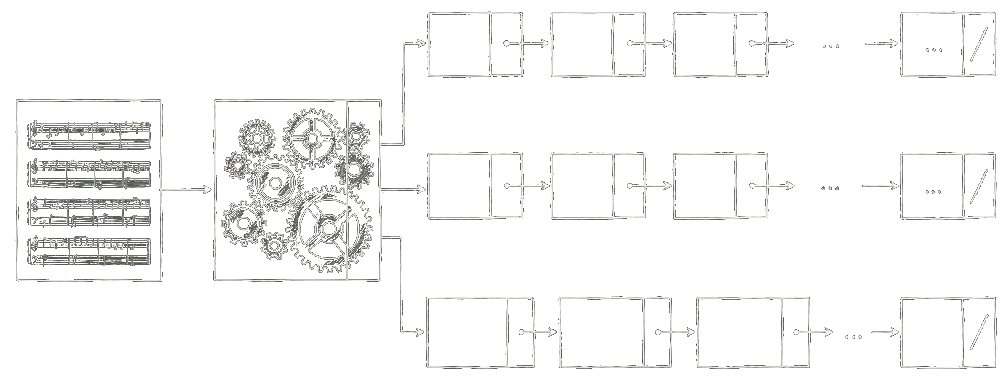
Each linked list is a voice, and all voices share the same total duration. Each link is a chord with a duration. In TinyBit a chord holds at most three notes, because we only have so many channels and infinite polyphony on a microcontroller is a nice dream. Tones and chords are defined according to MIDI.
sheet
├── voice
│   └── chord (duration)
│       └── note (tone)
├── voice
│   └── chord (duration)
│       └── note (tone)
└── voice
    └── chord (duration)
        ├── note (tone)
        └── note (tone)
implementing a mixer
Earlier I mentioned using SDL2_Mixer to play multiple sounds at once. That's not an option on a microcontroller, so I had to build a tiny mixer myself.
First question: how do we even hand audio to the hardware? We don't have a spare CPU core lying around to keep the speaker fed while the main core handles game logic and rendering. Luckily most modern microcontrollers have DMA, which lets you fill an audio buffer and tell the chip "play this while I go do something else." Free concurrency, more or less.
How big should the buffer be? Memory is tight, so as small as I can get away with. I made the buffer exactly one frame long. Each frame we synthesise the next chunk of audio while the previous one is playing. At a 22kHz sample rate that's 367 samples per frame, or 734 bytes of 16-bit audio. Very reasonable.
Each frame the synthesiser does this:
- iterate over each voice in the sheet
- check if the current chord is finished in terms of duration. if yes, advance to the next chord
- iterate over each note in the chord
- generate a waveform starting from the current phase
- apply an envelope
- apply gain
- add the modified waveform to the audio buffer
- update the phase
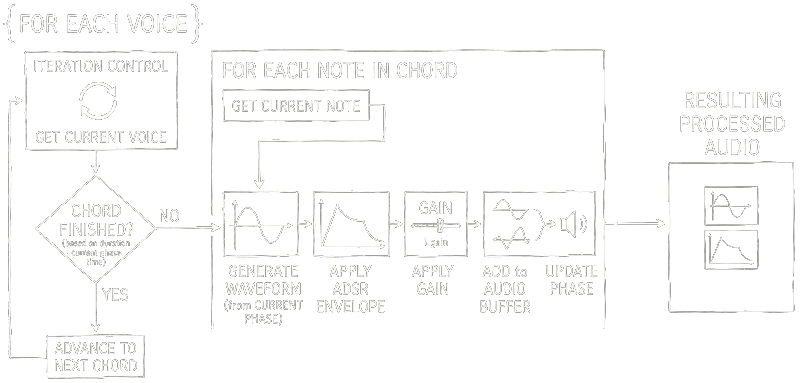
The platform layer then grabs that buffer and hands it off to whatever the host system uses. SDL2_Mixer on desktop, DMA on the microcontroller. The synthesiser doesn't care.
conclusion
The first time a recognisable melody came out of the speaker I sat there grinning at my desk for longer than I'd like to admit. The same demo game I'd been playing silently for weeks suddenly felt like an actual game. Audio does a lot of heavy lifting that you only notice when it's missing.
Building the audio engine forced me to learn things I'd happily ignored for years: how envelopes shape a tone, why the Game Boy sounds the way it does, and how much of "feel" in a game is really just well-timed beeps. The path here was longer than it needed to be, but the dead ends taught me more than the final design did. If you're building something similar, I'd recommend doing it the slow way at least once.